2026-02-13
How to Write a Transcript of a Video A Practical Guide
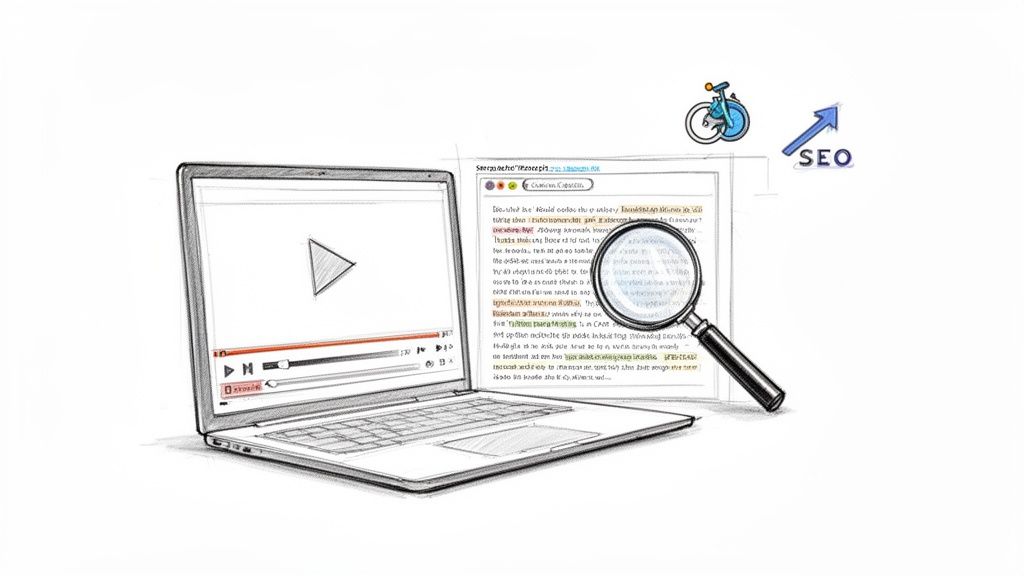
When it comes to writing a video transcript, you really have two options. You can either manually type every word yourself, which gives you total control but takes a lot of time, or you can use an AI-powered service to get a solid first draft in just a few minutes. Your choice really depends on your budget, how soon you need it, and how clear the audio is, but today's tools have made the whole process faster than it's ever been.
Why Video Transcripts Matter More Than Ever
Video is king, no doubt about it. But if there's no text version of your content, its message is trapped. A transcript unlocks the full potential of your video, turning spoken words into an asset that's searchable, accessible, and can be used in a dozen different ways. It’s not just an add-on; it's a strategic move for anyone creating content.
Think about a detailed corporate webinar or an in-depth university lecture. Without a transcript, all that valuable information is locked inside the video file. Add a transcript, and it instantly becomes a permanent resource anyone can scan and reference.
Unlocking Accessibility for All
At its heart, a transcript makes your content inclusive. It’s essential for people with hearing impairments or auditory processing challenges to be able to engage with what you’ve created. This isn't just about being considerate—it's about reaching the largest possible audience and meeting accessibility standards.
But the benefits go way beyond that. Plenty of people just prefer to read. They might be in a loud coffee shop, in a hurry, or just need to find one specific quote without having to scrub back and forth through the video timeline.
A transcript lets people engage with your content on their own terms. Some will skim it to see if the video is worth their time, while others will use it to copy and paste key quotes or data points.
The Power of Search Engine Optimization
One of the biggest wins you get from a transcript is the massive boost to your SEO. Search engines like Google can’t watch your video, but they are incredibly good at crawling and indexing text. When you post a transcript with your video, you’re essentially handing Google a keyword-rich document that it can fully understand.
This means your video can start ranking for all the different phrases spoken in it, not just the few keywords you put in the title and description. It’s a game-changer for discoverability and drives way more organic traffic.
Creating a video transcript is an investment in your content's long-term visibility. The market certainly reflects this, with the U.S. transcription industry hitting $30.42 billion in 2024. This growth is fueled by creators who are seeing up to 12% higher engagement on their transcribed content. You can learn more about the growing importance of video transcription efficiency and why it's become so critical.
2. Choosing Your Transcription Method: AI vs. Manual
So, you’re ready to get a transcript. Now comes the big question: do you hire a human or use an AI?
There’s no single "best" answer here. The right choice really hinges on what you need the transcript for, how quickly you need it, and what your budget looks like. It’s a classic trade-off between speed, cost, and pinpoint accuracy.
When a Human Touch is Non-Negotiable
A professional human transcriber is still the gold standard for situations where every single word and nuance has to be perfect. Think legal depositions, medical records, or academic research where misinterpreting a single phrase could have serious consequences.
People are just better at navigating the tricky stuff—like heavy accents, overlapping conversations, or highly specialized industry jargon. An AI might stumble, but a human can use context to get it right. Of course, that level of expertise comes with a higher price tag and a much longer turnaround time.
The Case for AI-Powered Transcription
For most content creators, podcasters, and marketers, an AI-powered service like is the way to go. The speed is just incredible. A one-hour video that might take a human 4-6 hours to transcribe can be done by an AI in less than 20 minutes.
This efficiency is what makes transcribing your entire video library or all your team meetings actually feasible. You get a solid draft back almost instantly, allowing you to move on to the next step in your workflow.
Sure, the initial accuracy might be around 95-98%, but for many uses—like pulling quotes for social media, creating internal meeting notes, or drafting a blog post—that’s often good enough to get started. And with a little bit of editing, you can easily clean it up to 99% accuracy yourself.
To make the decision clearer, let's break down the core differences.
AI Transcription vs. Manual Transcription at a Glance
| Feature | AI Transcription | Manual Transcription |
|---|---|---|
| Speed | Extremely fast. Minutes for a one-hour file. | Slow. Hours or even days for the same file. |
| Cost | Very affordable. Often cents per minute. | Expensive. Billed per minute or hour at a high rate. |
| Accuracy | Good (95-98%). Can struggle with accents & jargon. | Excellent (99%+). Handles complex audio with ease. |
| Scalability | Highly scalable. Can process hundreds of files at once. | Limited. A person can only work on one file at a time. |
| Best For | Podcasts, marketing videos, meetings, content repurposing. | Legal, medical, academic, and high-stakes media. |
Ultimately, the table highlights a simple reality: what you gain in perfection with a manual service, you sacrifice in speed and cost.
So, How Do You Choose?
Let’s boil it down to a few practical scenarios.
- You need speed and volume: If you’re publishing a weekly podcast or need to transcribe daily meetings, AI is your only real choice. It’s built for workflows that can’t wait.
- Accuracy is your top priority: When the transcript is for legal evidence or a published research paper, you can't afford any mistakes. This is where you invest in a professional human transcriber.
- You want the best of both worlds: For most everyday business and content needs, a hybrid approach is perfect. Use an AI to generate the first draft fast and cheap, then take 15-20 minutes to proofread and polish it yourself.
Think about the final destination of your transcript. Is it for boosting your video’s SEO and giving you a document to reference? An AI draft you quickly scan is perfect. Is it going to be submitted in a court case? You need the near-flawless accuracy only a human expert can deliver. Knowing this from the start will always point you to the right method.
Your AI Workflow for Flawless Transcripts
So, you've decided to use an AI for its speed. Smart move. But getting a great transcript isn't just a matter of uploading a file and hitting a button. There's a practical workflow to this that separates a rough draft from a polished, publication-ready document.
The goal isn't just to get the words down; it's to turn that 95% accurate text into a 99% perfect transcript without losing your mind in the process.
Prep Your Video for the Best Results
Before you even think about uploading, let's talk about the single most important factor for AI accuracy: audio quality. It's the classic "garbage in, garbage out" scenario. A few minutes of prep work here will save you hours of tedious editing later.
Is there a background hum or air conditioner noise? Run it through a simple noise-reduction filter. Is one speaker booming while another is barely a whisper? Use an audio editor to normalize the volume.
Think of the AI as a diligent assistant who's a bit hard of hearing. If you mumble or have a lot of background noise, it's going to mishear things. Speak clearly into the microphone, and the AI will reward you with a much more accurate first draft.
The Refinement Stage: Where the Magic Happens
Once you run your video through an AI tool, you'll have a draft transcript back in minutes. This is where your work begins, but trust me, it’s a world away from typing every word from scratch. Modern tools, like the one we've built into Kopia.ai, are a game-changer because they sync the text directly with the audio.
This means you can click on any word in the transcript, and the video player jumps to that exact moment. It makes hunting down and fixing those inevitable errors incredibly fast.
Here’s a simple look at the transcription decision process.
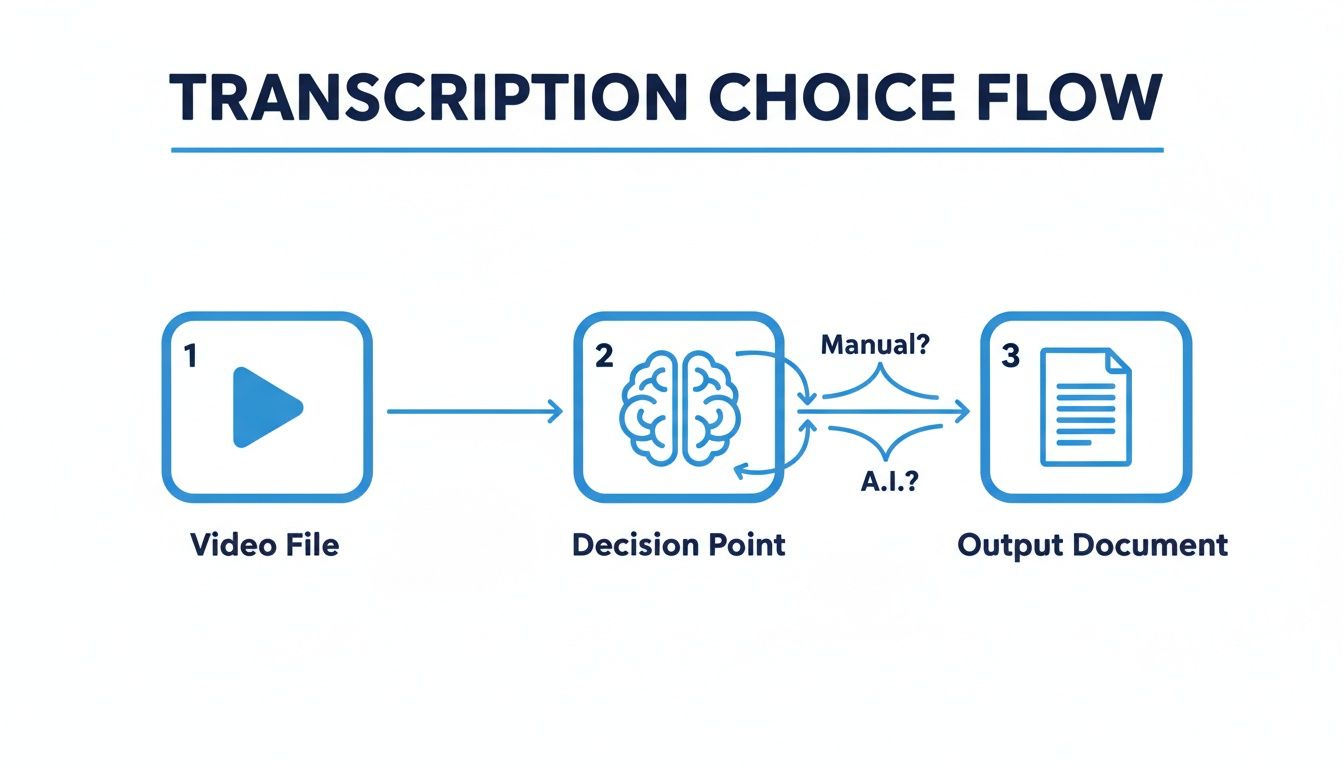
Whether you go manual or with AI, the destination is the same: a clean, usable document.
Common Fixes and Professional Polish
Your editing pass is all about elevating the transcript from "good enough" to flawless. I’ve found that AIs tend to stumble in a few predictable areas.
Here’s my personal correction checklist:
- Proper Nouns and Jargon: AI often butchers unique names, company branding, or niche industry terms. A quick find-and-replace can fix these across the entire document in seconds.
- Speaker Labels: The tool will likely label speakers generically as "Speaker 1" and "Speaker 2." You’ll want to go through and assign the correct names for clarity.
- Punctuation and Flow: This is where your human touch is essential. Read through the text to fix awkward punctuation and break up long, rambling sentences into short, easy-to-read paragraphs.
This whole process turns a monumental task into a manageable one. Think about it: manually transcribing a one-hour video could easily take you 6-10 hours of painstaking work. There's a reason the AI transcription market is exploding—projected to grow from $4.5 billion in 2024 to $19.2 billion by 2034. It just solves a massive pain point.
While a human doing it from scratch might have an error rate as high as 20%, a good AI gets that down to under 5%, giving you a much cleaner place to start.
By following this simple workflow, you can confidently turn any video into a polished, accurate text document. Our is designed to make this entire process as smooth as possible.
Making Your Transcript Easy to Read (and Great for SEO)
Getting an accurate transcript is just half the battle. The real magic happens when you format it properly. A raw wall of text is a huge turn-off for readers and doesn't do you any favors with search engines, either. The goal is to turn that block of words into a clean, scannable, and genuinely useful piece of content.
Think about it: formatting isn't just about making things look nice; it's about pure usability. Did you know that nearly 25% of people admit they'd rather just read the transcript than watch the video? They're trying to save time, find a specific piece of information quickly, or just see if the video is even worth their time. If your transcript is a dense, unformatted mess, you’re losing that entire audience right from the start.
First, Make It Skimmable
Your first job is to break up that wall of text. Treat it like a blog post. That means short paragraphs, clear headings, and logical breaks that guide the reader’s eye down the page.
- Short Paragraphs: Stick to one main idea per paragraph, keeping them around two to three sentences long. This makes the content feel way less intimidating.
- Speaker Labels: This is non-negotiable for any video with more than one speaker. A simple, consistent format like "Interviewer:" or "Dr. Evans:" makes conversations a breeze to follow.
- Timestamps: For longer content like webinars or in-depth interviews, adding timestamps at key topic changes or even every few minutes is a game-changer. It lets someone reading the transcript jump directly to that exact moment in the video.
This isn't just about looking organized. It turns your transcript from a static script into a dynamic, interactive resource that people will actually use.
A well-formatted transcript respects the reader's time. It acknowledges that many users will scan the text first to decide if the video content is worth watching. Making it easy for them to do so increases overall engagement with your content.
Formatting for Search Engines and Accessibility
The way you structure your transcript directly impacts how search engines and people with disabilities can access your content. For Google, a well-formatted transcript with speaker labels and clean paragraphs looks just like a high-quality, long-form article. It can index every single word, helping your video show up in search results for countless relevant keywords.
But the benefits don't stop there. This same formatted transcript is the foundation for your subtitles and closed captions. These files, usually in SRT or VTT format, are just your transcript broken down into perfectly timed chunks.
Getting these caption files ready is pretty straightforward:
- First, nail down the transcript. Get every word, speaker name, and punctuation mark exactly right.
- Next, match the text to the video's timing, adding start and end timestamps for each line or phrase.
- Finally, export it. Most good transcription tools will let you export directly to an SRT or VTT file, handling all the technical syntax for you.
These caption files are crucial for viewers who are deaf or hard of hearing, but they're also essential for the 85% of social media videos that are watched on mute. If you want to get into the nitty-gritty, you can learn more about . Ultimately, smart formatting makes your video content work harder for everyone.
Putting Your Transcript to Work
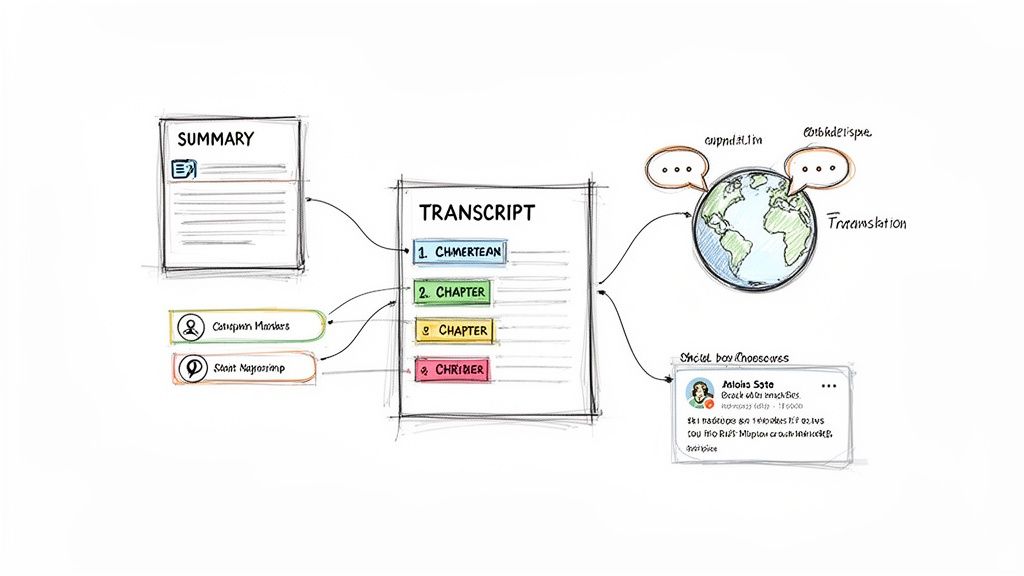
A perfectly polished transcript is so much more than a simple text file. Think of it as a launchpad for your content. Once you've got that clean text, you can go way beyond just accessibility and SEO. It's about to become your secret weapon for repurposing content, saving you a ton of time and squeezing every last drop of value out of that original video.
The transcription platforms we have today are getting incredibly smart. Many now come with AI features that treat your transcript like a structured database, opening up some amazing possibilities for creating new content.
Extracting Insights Instantly
Imagine you just wrapped up a long podcast interview. Instead of having to sit and re-listen for an hour to find the best soundbites, you just ask an AI to pull them for you. That's not science fiction; it's a real feature in many tools now.
With a clean transcript loaded up, you can get the AI to do some seriously heavy lifting automatically:
- Generate Summaries: Need a quick, bulleted summary for your show notes or an email newsletter? You can get one in seconds.
- Create Chapter Breakdowns: The AI can analyze the conversation, spot where the topics shift, and automatically create chapters with timestamps. This is a game-changer for making long videos easier for viewers to navigate.
- Pull Key Quotes: You can instantly grab the most powerful statements or interesting questions, giving you a ready-made list of quotes to turn into social media graphics.
If you're a researcher, this means you can spot key themes across hours of interview footage in a fraction of the time. For a podcaster, it’s about having detailed show notes ready to go almost instantly.
Your transcript basically becomes a conversational partner. You can literally ask it questions like, "What were the main topics discussed?" or "Pull all the questions the host asked," and get back structured answers. It completely changes how you work with your own content.
Reaching a Global Audience with Translation
One of the most powerful things you can do with a finished transcript is take your content global. The demand for non-English video is exploding—growing by 25% annually—which represents a massive, untapped audience for most creators.
Instead of trying to produce all new content for different regions, you can just use your original transcript as the foundation. Many AI tools now offer one-click translation, turning your English script into subtitles for dozens of other languages.
It's an incredibly efficient workflow. A single video can be fitted with subtitles in Spanish, French, Mandarin, and Hindi in just a few minutes, making it instantly accessible to millions of new people. It’s worth noting that videos with transcripts already tend to get 70% longer watch times and more backlinks. That benefit only gets bigger when you start catering to international viewers. You can and why they matter.
Ultimately, these advanced features redefine what a transcript really is. It stops being a static document and becomes a dynamic tool for analysis, repurposing, and global growth. For modern , it's an essential piece of the puzzle.
Frequently Asked Questions About Video Transcription
As you start transcribing your own videos, you're bound to run into a few common questions. I see the same ones come up time and time again. Let's clear up some of the most practical challenges you might face.
How Long Does It Really Take to Transcribe a 1-Hour Video?
This is the big one, and the honest answer is: it depends entirely on how you do it.
If you’re typing it out by hand, even a seasoned professional will spend four to six hours transcribing one hour of clear audio. That’s a significant chunk of time dedicated to pausing, rewinding, and typing. It's a grind.
Using an AI transcription service, however, is a game-changer. You can get a pretty good first draft of that same one-hour video back in about 15-20 minutes. The time you spend editing afterward will be a fraction of the manual slog and really just depends on how clean the original audio was.
What's the Difference Between a Transcript and Subtitles?
They both come from the words spoken in your video, but they serve completely different functions and look very different.
- A transcript is basically a text document. Think of it like a script or an article that contains every word spoken. Its main jobs are to make your video content readable to search engines (a huge SEO win) and to provide a reference document for your audience.
- Subtitles (often called closed captions) are the timed text that appears on the screen while the video is playing. Their primary purpose is accessibility, making sure people with hearing impairments or anyone watching with the sound off can still understand your content.
Here's a simple way to think about it: A polished transcript is the source material. From that single document, you can easily generate subtitle files (like the common .SRT format) that sync perfectly with your video.
Can I Transcribe a Video if the Audio Is Terrible?
You can, but you need to set your expectations. If your video is full of background noise, speakers are mumbling, or people are talking over each other, an AI's accuracy is going to take a nosedive.
This just means you'll have to spend a lot more time in the editing seat, manually fixing the mistakes. For the best, most painless results, always start with the clearest audio you can get. If you’re stuck with a poor recording, make sure your transcription tool has a synchronized editor—the kind where you can click on a word and it instantly plays that part of the audio. It’s a lifesaver for making quick corrections.
How Exactly Does a Video Transcript Help with SEO?
Search engines like Google are incredible at reading text, but they can't actually watch your video to figure out what it's about. A transcript is like giving them a book to read. It translates all your spoken content into a language they can crawl, understand, and index.
This is huge. It means your video can start ranking for all the specific phrases and long-tail keywords you mention, not just the handful of words in your title and description. It massively boosts your video's discoverability, turning every word you say into a potential doorway for someone searching for your content.
Ready to turn your videos into searchable, accessible assets? Get started with Kopia.ai and create your first flawless transcript in minutes.